

Operating System Concepts - Chapter 1
What the heck is an OS ?
The chapter starts by defining the basic components of a computer system: hardware, operating system, application programs, and users. If we used our user-view to the computer system, we can see a bunch of programs, hardware devices, and so and so (however, some computer systems are not user-facing like embedded systems that don’t need user interaction to perform, it just works). But if we look at it from a system-view, we can see operating system is just a resource allocator, or a control program that manages the hardware and software execution processes to prevent conflicts and errors.
But really what is an operating system? Those are really vague definitions right?. Operating system exists because it provides an abstraction to the users and applications. A more common definition of operating system is that it’s a program that’s running all the time, formally called the kernel, which is associated with different types of programs, like system programs and application programs. system programs are programs that are associated with the operating system, but not nessciarily part of the kernel, like file management programs, disk formatting programs, etc.
In general, operating system could involve a lot of different components, like:
- a running kernel
- system programs
- middleware frameworks for application development
In the rest of the chapter discusses the architecture, operations, resource management, and services of operating systems.
Computer System Organization
Generally speaking, a computer system consists of multiple hardware components connected together, each of them has a device driver that understands the device’s logic and can communicate with the device and the operating system. In general purpose computers, all device controllers are connected to a common bus (see the figure below for reference).
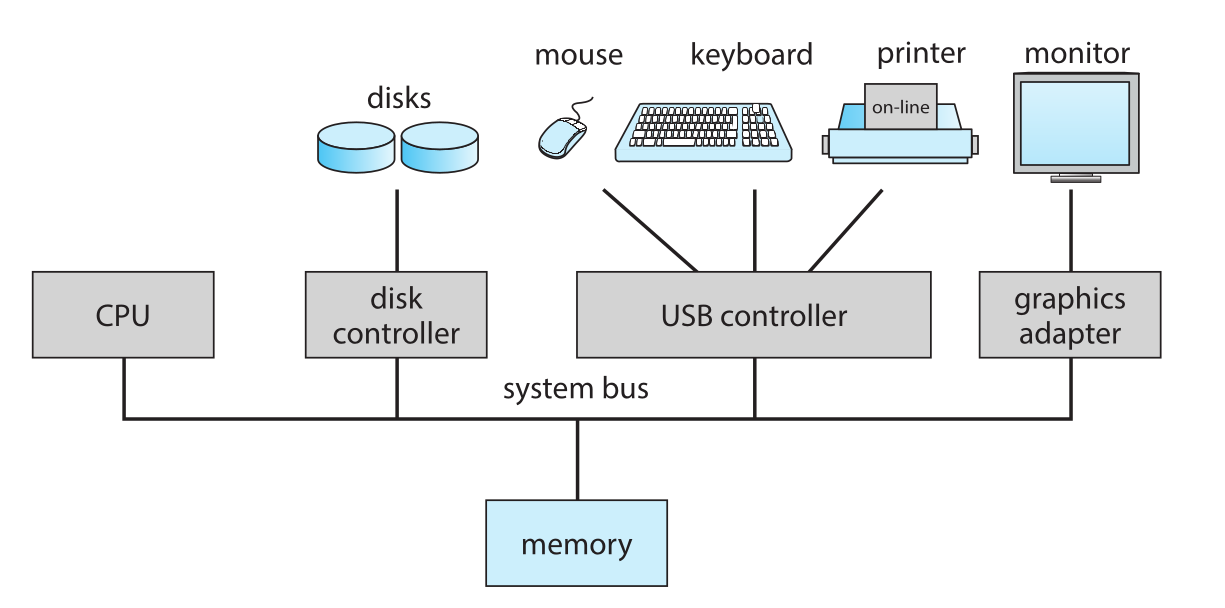
Now let’s discuss the main components of the system:
- Interrupts
- Storage Structure
- I/O
Interrupts
Imagine you are working with a team, and you want to make an efficient system for communication with each other while all working on your own tasks. you probably would make a bell for informing the manager that you finished something and need further instructions or whatever. Operating system decided to use interrupts as a way for devices to communicate with the CPU using the same fashion.
Interrupts are signals sent by device controllers to inform the CPU that they finished an operation. When the CPU is interrupted, it stops executing the current instructions, saves its current state, and go check out the service routine for the interrupt. After finishing, the CPU restores its previous state and continues executing the interrupted instructions.
Interrupts are very frequently happening (a simple click on the mouse or keyboard trying to stall your computer is an interrupt), so the CPU needs to be able to handle interrupts efficiently. Generally, a table of pointers to interrupt service routines is kept in memory head (also called interrupt vector) for quick access. But this is not enough for efficiency, modern approaches involves providing priorities to interrupts, most CPUs have two types of interrupts: maskable and non-maskable. Maskable interrupts can be ignored or delayed by setting a bit in a special CPU register, while non-maskable interrupts cannot be ignored (mostly errors and urgent stuff).
Remember when we said we store interrupt vectors in memory head? well, most of the computer have a lot of devices, and this vector would not hold for them all, additionally it will be costly to make one interrupt handler for each device. So a solution comes to be interrupt chaining, where each slot in the interrupt vector is actually pointing to a linked list of interrupt handlers. When an interrupt happens, the CPU goes to the corresponding slot in the interrupt vector, and loops through until finding the service that requested the attention (Think of it as a hash table or a load balancing technique).
Storage Structure
(ofc if you are rich enough you can have all of them I’m only representing myself here).
Storage devices only understands two operations, read and write. The read operation copies a word/byte from the storage device to the CPU, while the write operation writes them things into the memory.
I/O
I/O is the most important operation ever, and for this it has to be optimized as possible. In general purpose computers, I/O devices are connected to a bus remember ? If I want to transfer data from the disk to the main memory, I don’t have to get the CPU involved at all. Generally the CPU is the master of the bus. When an operation of transferring data like this happens, the CPU hands over the control to direct memory access (DMA) controller, which takes care of the transfer, after the CPU tells him all the needed info (source, destination, size, etc). After transfer is done, the DMA controller sends an interrupt to the CPU to inform it that the operation is done. While the DMA controller is doing its job, the CPU can do other things.
Even better these days, there are some hardware components to orchastriate these operations, called bus arbiter, which is responsible for managing the access to the bus at a time to avoid conflicts or stalls.